

Dynamic Stock Strategy Using Screener
In the previous article, we learnt how we can create a static basket of stocks and how we can assign weights to stocks. In this article, we will learn how we can create a dynamic strategy using the stock screener.
If you remember, we discussed that the stocks will remain the same in the static basket. But in the dynamic stock strategy (using a screener or factor model), the actual stocks will change based on your rebalancing and exit strategy. We will learn more about this in the current article.
So first things first! How to create a dynamic strategy using a screener? Just like the static basket, go to the strategy page, click on Create New, and then select Stocks . The below shown window will open.
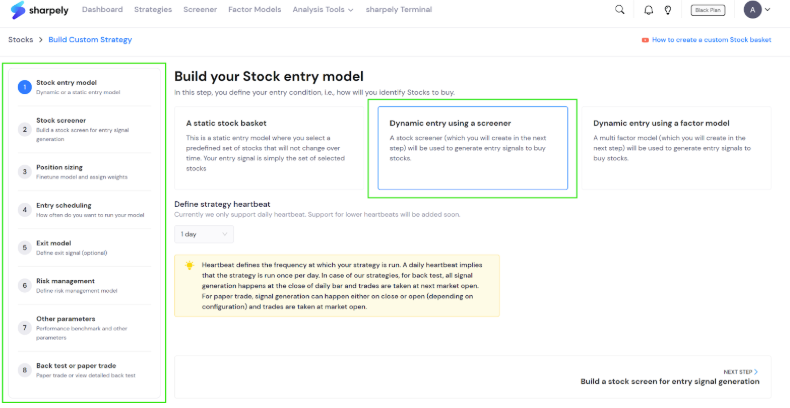
This time, we will select the second option: Dynamic entry using a screener . As we can see, we also have the option to select the heartbeat (the definition is highlighted in yellow). Currently, we support only 1-day heartbeat, but we will add more options in the coming months.
Also, you can see all the steps included in the dynamic strategy creation using the screener on the left. As you have noticed, there are more steps compared to the static baskets that we discussed in the previous article(hyperlink of the previous article). This is because dynamic strategy is more flexible and with our strategy builder you can create almost any kind of technical, fundamental, or technofunda strategy.
After selecting the second option, we will click on the next step (available at the left bottom).
In the next step, the screener window will open as shown below.
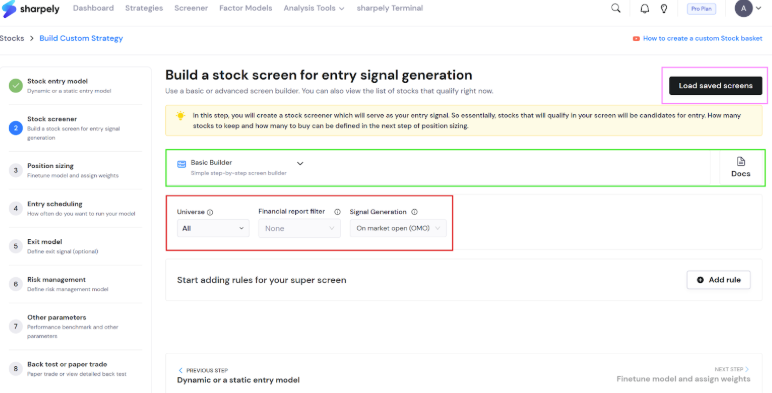
Here, you have a choice to build a screen using the basic or advanced builder. You can select your preferred builder from the dropdown as highlighted in green. We will create a simple screen in the advanced builder.
Apart from that you have three important choices as highlighted in red.
- Universe: Here you can select an index or custom-made universe that will act as the universe for your screen.
- Financial report filter: Using this, you can include only those stocks that have reported the latest quarter/fiscal earnings.
- Signal generation: As per your rebalancing frequency, your trader orders will be generated when you paper trade your strategy. This specific feature allows you to manage when your orders are generated.
For example, you want to do a weekly rebalancing on Friday. Then do you want to generate orders after Friday’s market close or on Monday at 9.30 AM? Some investors prefer ‘On market open’ as it gives you orders based on the latest data.
Now let’s create a simple screener in the advanced builder that filters stocks that have ROE and ROCE above 20% and PE ratio below 30. The below image has the condition block with the same condition.
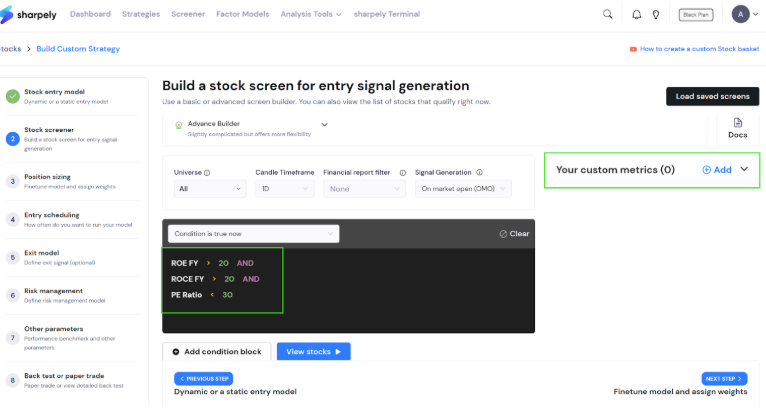
One more important thing. Our advanced builder is one of the most advanced screening tools you will find in the Indian market. You can do a lot of things by creating custom metrics and condition blocks. We have discussed all this in detail in our stock screener articles(hyperlinks to screener articles).
The next step is position sizing. We have discussed all the remaining steps in detail in an article series on strategy parameters. You can read them here.