

Understanding the instrument selection model
As discussed earlier, we support multiple kinds of strategies which are essentially permutations of stock selection models and strategy parameters.
Through articles in this section, we will cover 4 kinds of strategies which will differ primarily on the way they select instruments for trading. Note that by playing around with strategy parameters (discussed in the next section – ), you have the flexibility of creating almost any kind of strategy.
When creating a strategy, the first question you must answer is which instrument to trade. In this article, we will use stocks but all of it applies to ETFs and MFs as well.
I want to build a stock strategy and the first step is to decide the stocks to trade. That’s your stock selection model.
There are 2 types of models supported on sharpely:
1. Basket models – In this, you manually decide the stocks you want to invest in. This is suited for bottom-up investors who have narrowed down on a set of stocks (through deep fundamental research) and now want to create a portfolio of these stocks.
2. Dynamic (signal-based) models – In these models, stocks are not picked manually but by some set of rules defined by you. Currently, on sharpely, we support 2 types of rule encoding.
Screeners – Here, a stock screen is used to decide the stocks to invest in. The stock list can be further fine-tuned using the “position sizing”, discussed.
Factor model – Here, a factor model is used to pick stocks. Again, the stock list can be further fine-tuned using “position sizing”.
Note that stocks in the “Basket” model remain fixed over time. Only their weights change which can be rebalanced back to intended weights. Hence, these strategies are by nature low turnover.
In the case of dynamic models, the stocks themselves change over time. It is quite possible that by the time you rebalance, your entire portfolio gets sold and a completely new set of stocks are bought. Therefore, these strategies can be high turnover. Deciding on an optimal rebalancing frequency requires a tradeoff between keeping transaction costs low versus keeping the portfolio aligned with the latest signal.
Getting started
To start building a strategy, you need to go to the “Strategies” tab and click on “Create a new strategy”.
If you have already created some strategies before and paper trading them as we can see in the below image, the list will show up here. You can track them by clicking on them. All four strategies are being paper traded as highlighted in yellow .
But let’s come back to strategy creation.
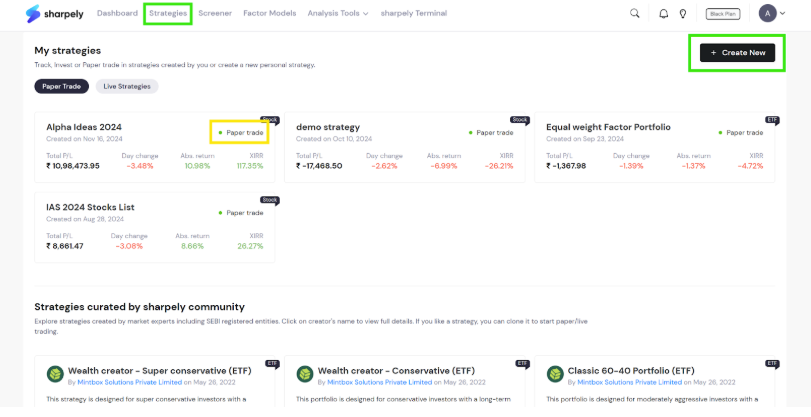
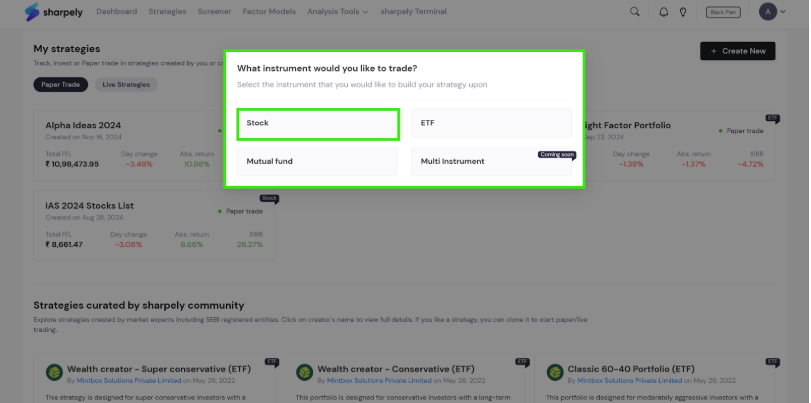
Once you click on the ‘Create New’ button, you will see the option for instrument selection as shown below.
In the next article, we will create a static stock basket strategy.